
18 KiB
How does the mixin build-system work?
Intro
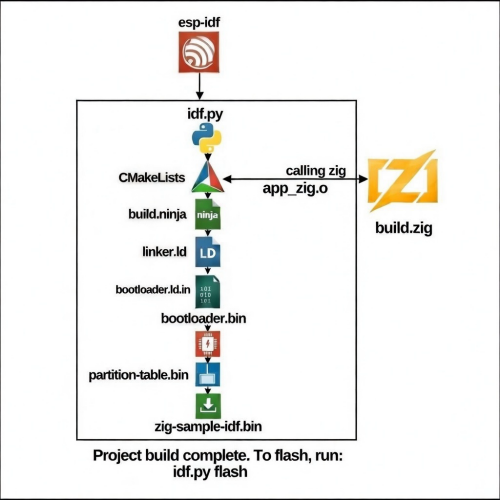
ESP-IDF uses the idf.py script as a wrapper around CMake. It's responsible for creating the build environment, running CMake to generate build files, and using Ninja to build the project.
The Zig build system (build.zig) is a wrapper around the Zig compiler and integrates with ESP-IDF's CMake infrastructure.
For more details about Zig commands, see doc/zig-xtensa
Building this project
After cloning this project, you need to install ESP-IDF and set up the environment:
-
Install ESP-IDF by following the official guide:
- Clone ESP-IDF repository:
git clone --recursive https://github.com/espressif/esp-idf.git - Run the installation script:
- Windows:
install.batorinstall.ps1 - POSIX:
./install.sh
- Windows:
- Clone ESP-IDF repository:
-
Set up the ESP-IDF environment variables:
- Windows: run
export.bator./export.ps1 - POSIX:
. ./export.sh
Once the environment is set up, you can build the project using this scheme:
- Windows: run
-
Set the target ESP device (if not already set):
idf.py set-target <esp-device>Supported targets:
- RISC-V:
esp32c2,esp32c3,esp32c5,esp32c6,esp32c61,esp32c61eco0,esp32h2,esp32h21,esp32h4,esp32s31,esp32p4,esp32p4eco4 - Xtensa:
esp32,esp32s2,esp32s3
- RISC-V:
-
Add managed components (optional):
idf.py add-dependency espressif/led_strip
idf.py add-dependency espressif/esp-dsp
Managed components are automatically detected during build and their headers are included in the Zig bindings.
-
Build the project:
idf.py buildThis will:
- Configure CMake and detect managed components
- Download/use appropriate Zig toolchain (espressif or upstream)
- Generate
idf-sys.zigbindings viatranslate-c - Apply target-specific patches
- Build Zig code into object files
- Link everything with ESP-IDF components
-
Flash the firmware to your device:
idf.py -p PORT flashReplace
PORTwith your device's serial port (e.g.,COM3on Windows or/dev/ttyUSB0on Linux) -
Monitor the device output:
idf.py monitor

Additional useful commands:
- Clean the project:
idf.py clean - Full clean and rebuild:
idf.py fullclean - Build and flash in one command:
idf.py -p PORT flash monitor - Show all targets:
idf.py --list-targets - Configure project:
idf.py menuconfig - Reconfigure (refresh component detection):
idf.py reconfigure
Current role of build.zig
Since the latest refactors (post #37 and related CMake changes), build.zig is focused exclusively on Zig code compilation:
What build.zig handles:
- Defines Zig modules:
esp_idf→ High-level facade module that re-exports safe wrappers fromimports/*.zig(gpio, wifi, heap, rtos, led, etc.)sys→ Low-level module that imports the generatedidf-sys.zig(raw C bindings)
- Collects and compiles Zig source files
- Uses pre-generated includes and dependencies from CMake
- Generates object files (
app_zig.o) that CMake links with ESP-IDF
What has moved to CMake:
- Searching and linking IDF object files and
.alibraries → handled by ESP-IDF's CMake system - Collecting include paths from IDF components → automatic via
zig-config.cmake - Running
translate-constubs.hto generateidf-sys.zig→ fully automated incmake/scripts - Applying target-specific patches → handled by
cmake/patch.cmake - Detecting and including managed components → automatic detection in
zig-config.cmake - Toolchain selection (espressif vs upstream Zig) → automatic based on target architecture
This separation makes the project cleaner:
- CMake handles the complex C/ESP-IDF world (toolchain, bindings generation, component management)
- Zig handles only modern, safe, comptime-friendly code compilation
Managed Components Integration
The build system automatically detects managed components installed via idf.py add-dependency:
Add extra-components like:
espressif/led_strip→HAS_LED_STRIPdefineespressif/esp-dsp→HAS_ESP_DSPdefineespressif/esp_bsp_devkit→HAS_ESP_BSP_DEVKITdefine
How it works:
- CMake detects components in
managed_components/directory - Adds component include paths to
INCLUDE_DIRS - Generates preprocessor defines (e.g.,
HAS_LED_STRIP=1) - Passes defines to
translate-cfor binding generation - Headers are conditionally included in
include/stubs.h:#if HAS_LED_STRIP #include "led_strip.h" #endif
To add a new managed component:
- Run:
idf.py add-dependency vendor/component - Add detection in
extra-components.cmake:check_managed_component("Component Name" "vendor" "component" "HAS_COMPONENT") - Add conditional include in
include/stubs.h - Use in Zig via the wrapped API in
imports/
Toolchain Selection
The build system intelligently selects the appropriate Zig toolchain:
RISC-V targets (all variants including H4/P4):
- Works with both upstream Zig and Espressif's Zig fork
- Upstream Zig: uses generic
riscv32-freestanding-nonewith feature flags (e.g.+m+a+c+zicsr+zifencei) - Espressif fork: uses named CPU models (e.g.
esp32c6,esp32p4) with exact feature sets - Build system auto-detects which toolchain is in use and selects the right CPU model
Xtensa targets (ESP32, ESP32-S2, ESP32-S3):
- Always uses Espressif's Zig fork (Xtensa support not in upstream)
The toolchain is automatically downloaded and cached in build/zig-relsafe-* if not found.
Advanced: Build System Internals
For advanced users who want to understand or modify the build system:
Key CMake files:
cmake/zig-config.cmake→ Main configuration, target detection, component discoverycmake/zig-download.cmake→ Automatic Zig toolchain downloadcmake/zig-runner.cmake→ Helper functions for running Zig commandscmake/bindings.cmake→ get esp-rs/esp-idf-sys bindings headercmake/extra-components.cmake→ helper to add more componentscmake/patch.cmake→ Post-processing patches for generated bindings
Bindings generation flow:
- CMake collects all IDF component include paths
- Detects managed components and adds their paths
- Runs
zig translate-coninclude/stubs.hwith all includes - Generates
imports/idf-sys.zigwith raw C bindings - Applies target-specific patches (ESP32-H2, H4, P4)
- Zig code imports via
@import("sys")or high-level@import("esp_idf")
Zig module structure:
imports/
├── idf-sys.zig          # Generated C bindings (don't edit manually)
├── esp_idf.zig          # Main facade module
├── gpio.zig             # GPIO wrapper
├── wifi.zig             # WiFi wrapper
├── heap.zig             # Heap allocators
├── rtos.zig             # FreeRTOS wrappers
├── led-strip.zig        # LED strip wrapper (requires HAS_LED_STRIP)
└── ...                  # Other high-level wrappers
In your Zig code:
const idf = @import("esp_idf");
const sys = idf.sys;  // Access raw C bindings if needed
const led = idf.led;  // Use wrapped APIs (recommended)
This architecture allows safe, idiomatic Zig code while maintaining full access to ESP-IDF's C APIs when necessary.
Build Scheme Graph
┌─────────────────────────────────────────────────────────────────────────┐
│                            ESP-IDF Build System                         │
└─────────────────────────────────────────────────────────────────────────┘
                                    │
                                    ▼
                            ┌───────────────┐
                            │   idf.py      │
                            │   (Python)    │
                            └───────┬───────┘
                                    │
                    ┌───────────────┴───────────────┐
                    ▼                               ▼
            ┌───────────────┐            ┌──────────────────┐
            │  set-target   │            │  add-dependency  │
            │  (esp32c6)    │            │  (managed_comps) │
            └───────┬───────┘            └────────┬─────────┘
                    │                             │
                    └──────────────┬──────────────┘
                                   ▼
                         ┌─────────────────┐
                         │   CMake         │
                         │   Configure     │
                         └────────┬────────┘
                                  │
        ┌─────────────────────────┼─────────────────────────┐
        │                         │                         │
        ▼                         ▼                         ▼
┌──────────────┐    ┌─────────────────────┐    ┌──────────────────┐
│ ESP-IDF      │    │  zig-config.cmake   │    │  Component       │
│ Components   │    │  • Detect target    │    │  Detection       │
│ (.a libs)    │    │  • Find toolchain   │    │  (managed_comps) │
└──────┬───────┘    │  • Collect includes │    └────────┬─────────┘
       │            │  • Check components │             │
       │            └──────────┬──────────┘             │
       │                       │                        │
       │            ┌──────────▼──────────┐             │
       │            │  bindings.cmake     │             │
       │            │  • Build INCLUDE    │◄────────────┘
       │            │    list with        │
       │            │    managed_comps    │
       │            │  • Generate defines │
       │            │   (HAS_COMP_NAME)   │
       │            └──────────┬──────────┘
       │                       │
       │            ┌──────────▼──────────┐
       │            │  zig translate-c    │
       │            │  stubs.h →          │
       │            │  idf-sys.zig        │
       │            └──────────┬──────────┘
       │                       │
       │            ┌──────────▼──────────┐
       │            │  patch.cmake        │
       │            │  • Fix bitfields    │
       │            │  • Target patches   │
       │            │    (H2, H4, P4)     │
       │            └──────────┬──────────┘
       │                       │
       │                       ▼
       │            ┌─────────────────────┐
       │            │    build.zig        │◄─────────┐
       │            │  • Import idf-sys   │          │
       │            │  • Define modules:  │          │
       │            │    - esp_idf        │          │
       │            │    - sys            │          │
       │            │  • Compile Zig      │          │
       │            │    sources          │          │
       │            └──────────┬──────────┘          │
       │                       │                     │
       │                       ▼                     │
       │            ┌─────────────────────┐          │
       │            │  Zig Compiler       │          │
       │            │  (upstream or       │          │
       │            │   espressif fork)   │          │
       │            └──────────┬──────────┘          │
       │                       │                     │
       │                       ▼                     │
       │            ┌─────────────────────┐          │
       │            │   app_zig.o         │          │
       │            │   (Zig object)      │          │
       │            └──────────┬──────────┘          │
       │                       │                     │
       └───────────────────────┼─────────────────────┘
                               │
                               ▼
                    ┌─────────────────────┐
                    │   Ninja / Make      │
                    │   Link all objects  │
                    │   + ESP-IDF libs    │
                    └──────────┬──────────┘
                               │
                               ▼
                    ┌─────────────────────┐
                    │   ELF Binary        │
                    │   ├─ bootloader.bin │
                    │   ├─ partition.bin  │
                    │   └─ app.bin        │
                    └──────────┬──────────┘
                               │
                    ┌──────────▼──────────┐
                    │  idf.py flash       │
                    │  (esptool.py)       │
                    └──────────┬──────────┘
                               │
                               ▼
                         ┌──────────┐
                         │  ESP32   │
                         │  Device  │
                         └──────────┘

┌─────────────────────────────────────────────────────────────────────────┐
│                         Key Data Flows                                  │
├─────────────────────────────────────────────────────────────────────────┤
│  1. Component Discovery: CMake → managed_components/ → HAS_* defines    │
│  2. Binding Generation: stubs.h + includes → translate-c → idf-sys.zig  │
│  3. Zig Compilation: build.zig → zig build-obj → app_zig.o              │
│  4. Final Link: ESP-IDF .a libs + app_zig.o → firmware.elf              │
└─────────────────────────────────────────────────────────────────────────┘
Led-dtrip component e.g:
┌─────────────────────────────────────────────────────────────────────────┐
│                      Managed Components Flow                            │
├─────────────────────────────────────────────────────────────────────────┤
│  idf.py add-dependency espressif/led_strip                              │
│         ↓                                                               │
│  managed_components/espressif__led_strip/                               │
│         ↓                                                               │
│  zig-config.cmake detects component                                     │
│         ↓                                                               │
│  Adds: -DHAS_LED_STRIP=1 -I.../espressif__led_strip/include             │
│         ↓                                                               │
│  stubs.h: #if HAS_LED_STRIP → #include "led_strip.h"                    │
│         ↓                                                               │
│  translate-c generates bindings                                         │
│         ↓                                                               │
│  Zig code: const led = @import("esp_idf").led;                          │
└─────────────────────────────────────────────────────────────────────────┘